Use Coursework for practice and homework. Use Scheduled exam when everyone’s exam should end at the same moment, and Timed exam when each student gets the same amount of time from whenever they start.
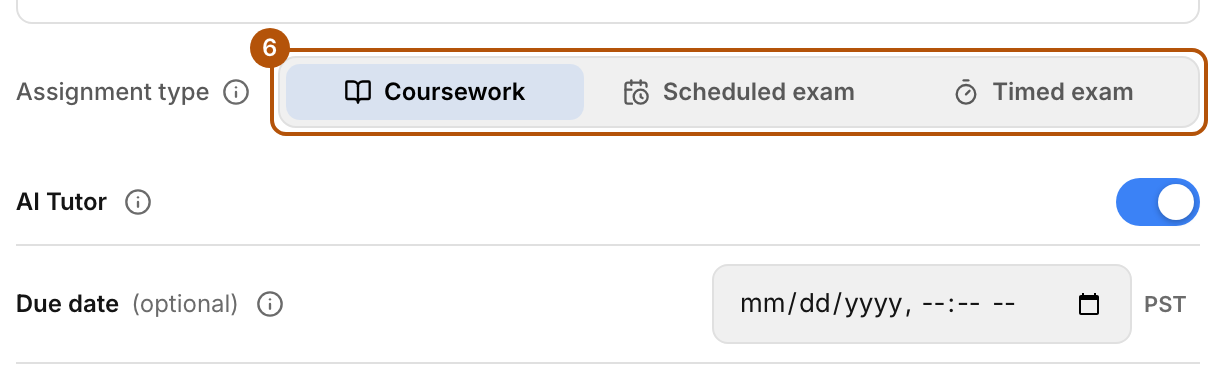
Coursework
“No time limit. Due date optional.” It’s graded when a student finishes, at the due date if you set one, or whenever you press Grade. Unfinished work is graded at the deadline. Students can keep working after that, and their score updates.
Scheduled exam
“Exam ends for all at a set date & time.” The Due date is required and is the moment the exam ends. Submissions stop and every student is graded. A student who never starts gets a zero.
Timed exam
“Timer starts when each student begins.” Set a Time limit. The clock starts the first time each student opens the exam, and their attempt closes when their time runs out. The Due date is also required: it’s the last moment anyone can work, and it closes the assignment for students who never start.
What changes in either exam
- AI Tutor is always off.
- Objectives don’t light up as the student works. Results appear after they submit.
- The app’s study labels on terminals are hidden. Markings printed on the real gear stay visible, the same as on the job.
- Students get one submission, and hand in their work with Submit Test.
- On a timed exam, students see a countdown of the time remaining.
Common problems
- “A scheduled exam needs the date and time it closes.” Set a Due date.
- “A timed exam needs a time limit.” Enter hours and minutes under Time limit, and set a Due date as well.
- I set an exam but AI Tutor won’t switch on. That’s expected. Exams always run without the tutor.